

Unbox your creativity with ESPHome 2026.6.0
The ESPHome blog is a new space for us – and you! We usually share our updates through raw, engineering-focused changelogs. While that technical documentation isn’t going anywhere, we want to make our milestone releases more digestible for everyone in the community – regardless of your experience with creating custom smart home devices.
This new way of sharing information goes hand-in-hand with all the work we’ve been doing to make ESPHome (and all Open Home Foundation projects) more accessible. It’s also why the latest release of ESPHome is focused on lowering the barrier to entry: a shift especially relevant with the highly anticipated release of the ESPHome Starter Kit around the corner.
By moving towards intuitive visual interfaces and optimizing how our microcontrollers manage processing power, we’re making the ecosystem more approachable for complete beginners without sacrificing the depth, control, and granular flexibility our more experienced users love.
Think of this update as a thorough organizing of a communal workshop, ensuring your local devices run faster, utilize less memory, and stand ready as durable components of a private, sustainable smart home.
Making ESPHome more accessible
Section titled “Making ESPHome more accessible”With this in mind, let’s look at the updates designed to make your life easier. Part of the satisfaction of creating your own smart home gear is the process itself: embracing the sometimes chaotic, but joyful, mess of wires and components scattered across your desk. We want to enhance that creative, hands-on experience, while stripping away the unnecessary technical frustrations that can block a good project from getting off the ground.
Explore with the new ESPHome Device Builder
Section titled “Explore with the new ESPHome Device Builder”To do this, we’ve officially retired the old text-heavy dashboard and replaced it with a visual workspace designed to remove the guesswork and get your project up and running without headaches. Think of it like baking a cake from scratch. The pleasure comes from mixing the ingredients yourself, but you still want a recipe that’s easy to follow and promises a tasty result: in this sense the new Device Builder 1.0.0 is what you need!
Rather than serving as a blank text editor, the new builder is a tool for creative discovery. It features an interactive component catalog that suggests ideas and layout configurations as you build, transforming a technical task into an exploration of what’s possible.
And don’t worry, if you enjoy editing the YAML directly, you still can!
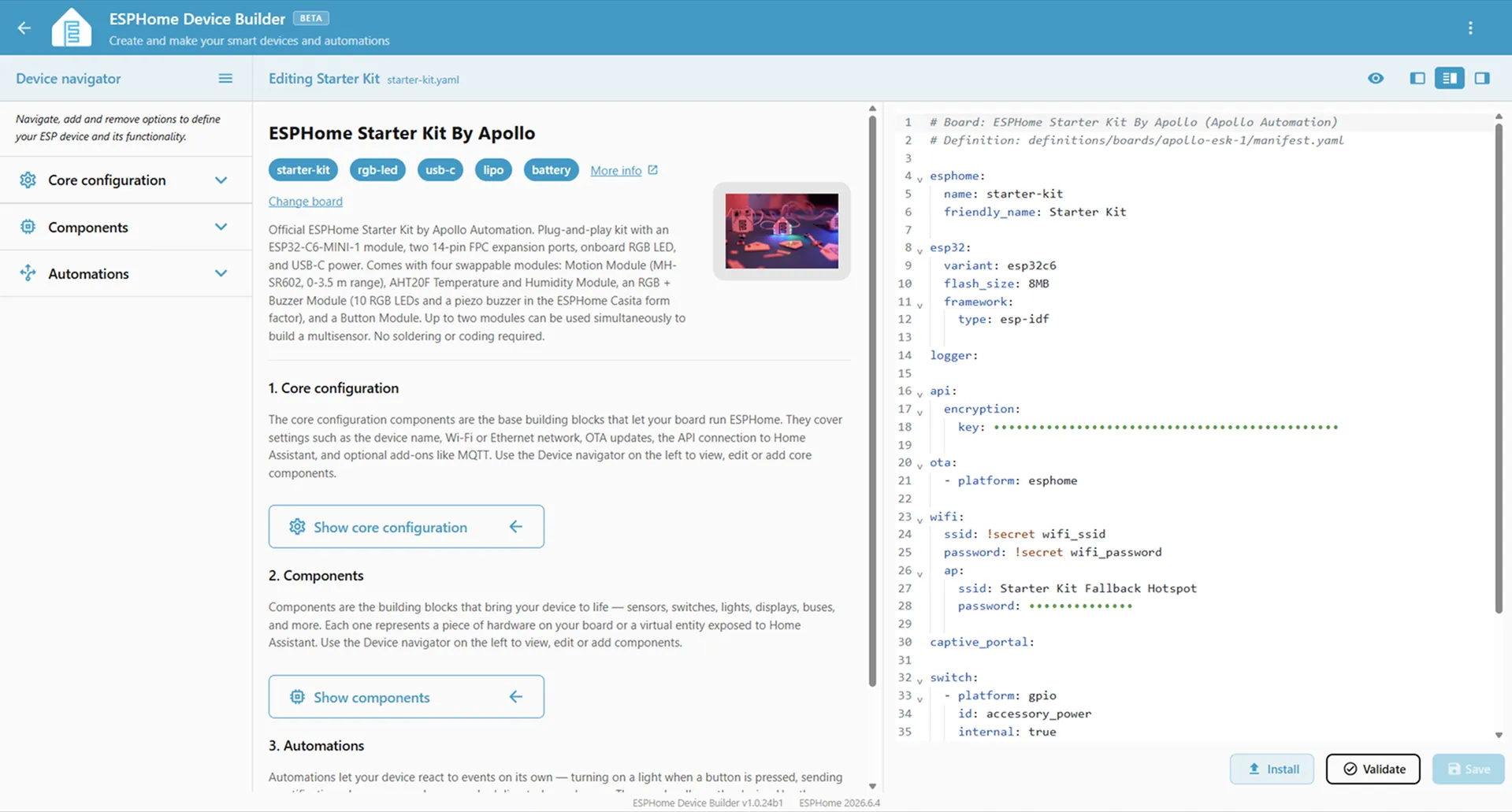
That same flexibility applies to setting up your hardware. For example, the Device Builder can tell you which pins are available on each board so you don’t need to go on a treasure hunt for datasheets of each development to find out for yourself. Combined with inline help and guidance right inside the workspace, you no longer need twenty different browser tabs open just to debug a stray wire.
What’s more, you don’t have to wait for one device to finish installing before moving to the next. The builder introduces background multitasking, letting you queue compilation, installation, or clean-up tasks across multiple hardware nodes without freezing up your browser tab.
What this means for advanced users
Section titled “What this means for advanced users”Don’t let this beginner-friendly focus fool you: this workspace is a massive productivity upgrade for advanced users too. By replacing manual datasheet cross-referencing with an integrated pin list, you lose the mental fatigue of tracking complex wiring layouts.
Combined with the background multitasking, you can now manage, compile, and push updates to an entire fleet of hardware nodes back-to-back, transforming what used to be a tedious afternoon of sequential flashing into a fast, parallel workflow.
Under the hood: Faster, leaner, and more capable
Section titled “Under the hood: Faster, leaner, and more capable”While the new visual interface changes how you interact with ESPHome, we’ve also overhauled how it runs on your devices. By optimizing data flows so they respond faster, you have plenty of room for growth as you add more features. Key highlights from this release include:
- Reclaimed memory: If you build a battery-powered sensor that turns off its WiFi to save energy, the system now “reclaims” that dormant network memory. This frees up crucial space on the chip, helping to keep your device running smoothly.
- Smoother screens and sound: Fans of custom touchscreens or media players will find that layout validation is now up to 4.5 times faster, and audio flows through a direct pipeline to cut sound stuttering and voice lag.
- Next-gen hardware support: We’ve baked native support for popular hardware right into the core. This includes everything from high-fidelity audio chips and industrial pressure sensors to next-gen mmWave micro-radars that can pinpoint the positioning of multiple people in a room at once.
🛠️ Looking for the full changelog? This is just a high-level look at the biggest upgrades. If you want to dive into the complete, line-by-line list of every single bug fix, supported chip version, and technical milestone in this release, check out the full 2026.6.0 changelog.
Three things to try this weekend
Section titled “Three things to try this weekend”With the new tools live, now’s a great time to clear your desk, grab a microcontroller, and dive in! Here’s some inspiration for your next project:
- Match your hardware: Start a project quickly and easily by picking your board from our new Board Catalog. From there you can load the correct settings automatically and get building straightaway. We’ve even integrated community-submitted hardware configurations directly from devices.esphome.io.
- Browse the components: Once your board is set, take a tour of the Component Catalog to discover what else is possible. This massive list of supported sensors, lights, and switches shows how easy it is to drop them into your project without typing a single line of code.
- Get ready for the Starter Kit: If you don’t have any components yet and don’t know where to begin, help is coming! Stay tuned to our ESPHome social channels and our website: the official ESPHome Starter Kit, made by Apollo Automation, will be shipping soon… and we have more updates on the way!
Quick note for returning users
Section titled “Quick note for returning users”Are you an advanced user updating an existing fleet of smart devices? While this blog highlights our new beginner-friendly features, this release does include a few syntax modernizations for legacy configurations. Be sure to check out the Upgrade Checklist over on our official technical changelog before deploying your updates.