

Teleinformation from Linky electrical meter.
Component/Hub
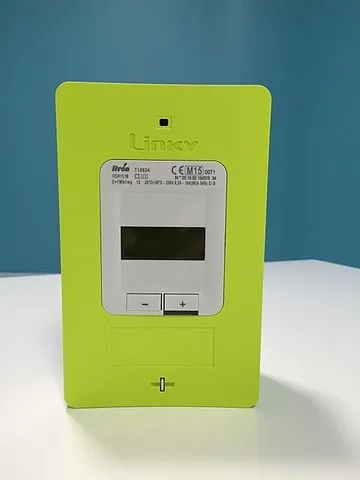
Section titled “Component/Hub”The teleinfo component allows you to retrieve data from a
French electrical meter using Teleinformation (datasheet). It works with Linky electrical
meter but also legacy EDF electrical meter.
..
A simple electronic assembly with an optocoupler and a resistor could let you retrieve detailed power consumption or power production. There are plenty of examples on the web.
As the communication with the Teleinformation is done using UART, you need to
have an UART bus in your configuration with the rx_pin
connected to the output of the optocoupler component. Additionally, you need to
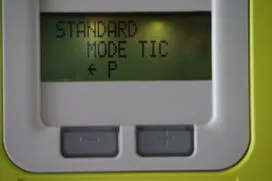
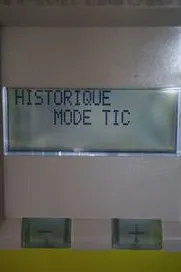
set the baud rate to 9600bps if meter is configured to work in standard
mode or 1200bps in historical mode. To find out which mode you are using,
simply press -/+ buttons on the meter and look for Standard mode or
Historical mode as below.
..
..
# Example configuration entryteleinfo: id: myteleinfoConfiguration variables
Section titled “Configuration variables”In teleinfo platform:
-
historical_mode (Optional): Whether to use historical mode or standard mode. With historical mode, baudrate of 1200 must be used whereas 9600 must be used in standard mode. Defaults to
false. -
update_interval (Optional, Time): The interval to check the sensor. Defaults to
60s. -
uart_id (Optional, ID): Manually specify the ID of the UART Component if you want to use multiple UART buses.
-
id (Optional, ID): Manually specify the ID used for code generation or multiple hubs.
Sensor
Section titled “Sensor”sensor: - platform: teleinfo tag_name: "HCHC" name: "Off-peak hours consumption" teleinfo_id: myteleinfo - platform: teleinfo tag_name: "HCHP" name: "Peak hours consumption" teleinfo_id: myteleinfo - platform: teleinfo tag_name: "PAPP" name: "Apparent power" teleinfo_id: myteleinfo- tag_name (Required, string): Specify the tag you want to retrieve from the Teleinformation.
- teleinfo_id (Optional, ID): Specify the ID of used hub.
- All other options from Sensor.
Pre-Defined Sensor Configurations
Section titled “Pre-Defined Sensor Configurations”The unit_of_measurement, device_class and state_class of a sensor are set automatically
based on the prefix of its tag_name, for the main tags of both standard and historical mode:
| Tag prefix | Mode | Unit | Device class | State class |
|---|---|---|---|---|
EA | Standard | Wh | energy | total_increasing |
ER | Standard | varh | reactive_energy | total_increasing |
IRMS | Standard | A | current | measurement |
URMS, UMOY | Standard | V | voltage | measurement |
SINST, SMAX | Standard | VA | apparent_power | measurement |
PREF, PCOUP | Standard | kVA | apparent_power | measurement |
CC | Standard | W | power | measurement |
BASE, HCH, EJP, BBRH | Historical | Wh | energy | total_increasing |
IINST, IMAX, ISOUSC, ADPS, ADIR | Historical | A | current | measurement |
PAPP | Historical | VA | apparent_power | measurement |
PMAX | Historical | W | power | measurement |
For example, IINST1, IINST2 and IINST3 all match the IINST prefix.
Tags that do not match any prefix get the following defaults: unit Wh, device class energy,
state class total_increasing and icon mdi:flash.
Any value you set explicitly in your configuration takes precedence over the pre-defined one.
If you set a unit_of_measurement that is compatible with the pre-defined device_class (for example
kWh for an energy tag, or mA for a current tag), the pre-defined device_class is kept.
If it is not compatible, the pre-defined device_class is not applied, so that you don’t end up
with an inconsistent combination. The same applies the other way round when you set device_class.
sensor: - platform: teleinfo tag_name: "HCHP" name: "Peak hours consumption" # kWh is compatible with the pre-defined energy device class, which is kept unit_of_measurement: "kWh" filters: - multiply: 0.001 accuracy_decimals: 3 teleinfo_id: myteleinfoWARNING
Previously, every sensor defaulted to Wh/energy/total_increasing, whatever its tag.
Sensors whose tag matches a prefix above now use the correct unit and device class, for example
PAPP now reports VA instead of Wh. To keep the previous behavior, set unit_of_measurement,
device_class, state_class and icon explicitly.
Text Sensor
Section titled “Text Sensor”text_sensor: - platform: teleinfo tag_name: "OPTARIF" name: "optarif" teleinfo_id: myteleinfo- tag_name (Required, string): Specify the tag you want to retrieve from the Teleinformation.
- teleinfo_id (Optional, ID): Specify the ID of used hub.
- All other options from Text Sensor.